
Step 4: Launching
WarningLiving Skyrim 4 is no longer under active development and is being superseded by Living Skyrim 5. Support for LS4 will be minimal, and we are no longer accepting bug reports or suggestions for Living Skyrim 4.
To actually launch and then play Living Skyrim, follow these steps:
- Open Mod Organizer 2: Navigate to your Living Skyrim folder and launch the included copy of Mod Organizer 2.
- Select Living Skyrim: In the top-right corner, select
Living Skyrim [SKSE]from the dropdown. - Start the Game: Click on the
Runbutton. The dropdown and Run button.
 - Update Game Registry: If prompted, confirm the game’s registry path update. If you’re not asked, move to the next step.
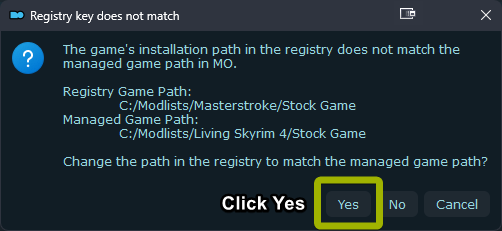 Registry popup, click Yes when prompted.
 - Shortcut Option: For convenience, create a desktop shortcut using the
Shortcutbutton below theRunbutton. - Start a New Game: Once Skyrim starts, choose to create a new game.Caution
The list uses DPI Scaling Fix, it will only be applied after the first launch. So if your game isn't correctly scaled to your monitor on first launch, restart your game, and it will be fixed.
- Create & Name Your Character: Choose your character’s appearance and name.
- Wait for Mod Initialization: After gaining control of your character, wait. Mods will initialize, showing in the top-left. Wait until no more mods appear.Warning
Do not load a previous save or one from another modlist. This can corrupt the save.