
Step 4: Launching
To actually launch and then play Zenithar's Forge, follow these steps:
- Open Mod Organizer 2 via the
ModOrganizer.exein your Zenithar's Forge folder. - In the top-right of Mod Organizer 2, select “Zenithar's Forge [SKSE]” in the dropdown menu.
- Click the large Run button to launch the modlist.

The dropdown and Run button.
- If you receive a prompt to update the game's registry path, click “Yes”. If you don't receive this prompt, you've likely already done this and can carry on.
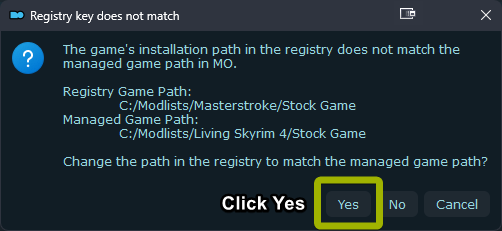
Registry popup, click Yes when prompted.
- If you'd like, you can also use the “Shortcut” button below the Run button to create a desktop shortcut for launching the list.
Warning
Do not load a previous save or one from another modlist. This can corrupt the save.