
18+ NSFW
Mature content ahead
Masterstroke is an adult-oriented modlist intended for players aged 18 or older. By entering you confirm that you meet your local age of majority and consent to viewing mature content.
Step 4: Launching
To actually launch and then play Masterstroke, follow these steps:
- Launch the copy of Mod Organizer 2 found inside your Masterstroke folder.
- In the top-right corner of Mod Organizer, you’ll see a large dropdown menu. Select Masterstroke [SKSE] from this dropdown menu.
- Click the large Run button.

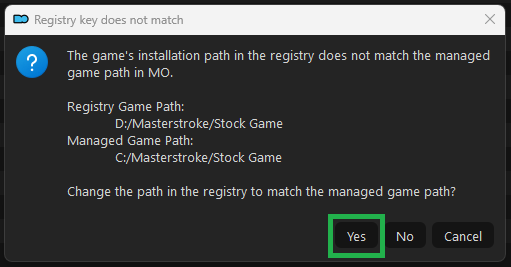
- A message box may appear asking you to update the game’s registry path. Click Yes on this popup if it appears. If it does not appear, it is not an issue and likely means you’ve already done this.
- This is how Masterstroke should always be launched. You can create a shortcut to this selection on your desktop, if you wish, using the Shortcut button directly below the large Run button.
- Once Skyrim starts, create a new game.
- Create your character and name them whatever you’d like.
- As soon as you gain control of your character, do nothing. The mods are initializing and this can take several minutes. You’ll see a list of mods appearing in the top left corner of your screen.
- Once you see that no more items are appearing in the list in the top left, you can proceed to the next steps.
Warning
Masterstroke requires that the MCMs be configured for the list to work properly. Many features are disabled or incorrectly configured when a new game is created. The MCM Recording is not optional. For details about this process, please refer to Step 5 MCM & Chracter customization.
Warning
Loading a save from another modlist or from before you installed Masterstroke will corrupt that save, do not do this.