
Mature content ahead
Masterstroke is an adult-oriented modlist intended for players aged 18 or older. By entering you confirm that you meet your local age of majority and consent to viewing mature content.
Step 5: MCM & Character Customization
MCM Configuration
It’s important that you do the following steps in the order they are presented. Skipping around or going out of order is bad.
When you are finished making your character, a bunch of text will start scrolling in the top left-hand corner of the screen.
- Wait for all text to disappear from the top left before proceeding. (~2 minutes).
If you receive any pop-up messages during this wait, click through them. - Now, save your game. Then load that save.
- A popup may appear from SexLab - Sexual Fame talking about a consistence check of Papyrus location storage failing. This popup can be safely ignored, the issue will be resolved in a moment by MCM Recorder.
- Once again, text will appear in the top left hand corner of the screen. Wait for all text to disappear from the top left before proceeding. (~1 minute)
- Now press Esc, go into MOD CONFIGURATION and find MCM Recorder.
- Under the text "Choose a recording to play", click on the MASTERSTROKE MCMS option. You’ll be prompted to exit the MCM. Do so. You’ll then receive a popup with information about the MCM preset you’ve chosen. Click “Run Recording”.
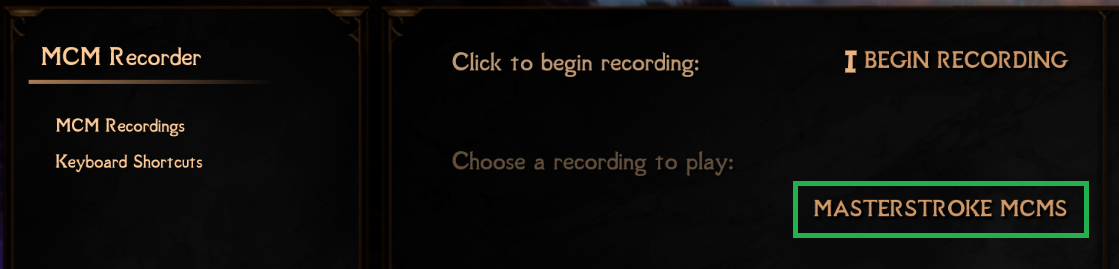
- You'll be prompted to exit the MCM. Click Yes, then OK and press the escape button three times to exit the MCM.
- Click on Run Recording to start the recording that sets up all MCMs automatically.
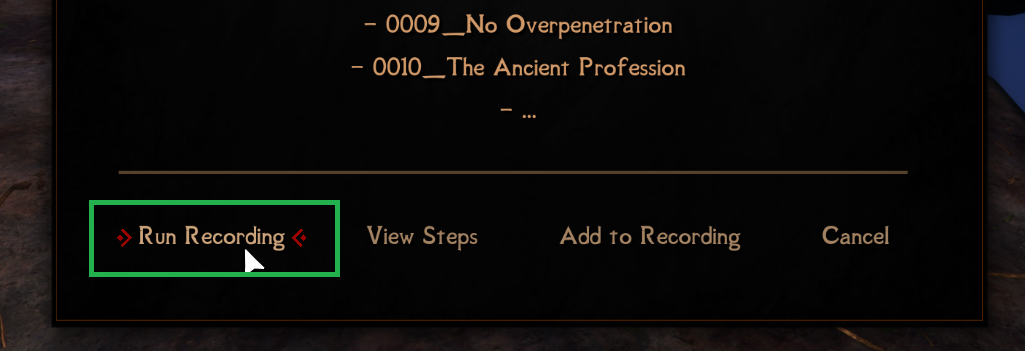
- Once again, WAIT. This can take up to 10 minutes to complete. During this wait, if you receive any pop-up messages, click through them.
When it is finished, you will receive one final pop-up message stating the MCMs are now configured. - Now save your game. Then load that save. Yes, this must be done a second time.
Hotkeys
Some important hotkeys to keep in mind are:
- F11 brings up an overview of all hotkeys
- F5 to save and F9 to load. (autosaves are disabled)
- Right Alt toggles the compass
- Mouse button 5 to lock on an enemy
- When struggling out of devices: press A when you flash blue, D for green, and S for cutting.
Character Customization
The following steps should only be completed after you have completed the MCM steps for Masterstroke.
Sets of Skills
Sets of Skills is a class mod that I encourage you to read the mod page about. It will allow you to select a class for your character that will give you buffs as you level up. Be sure to read the options carefully. To select a class, open the Sets of Skills MCM and pick a class from the dropdown menu.
OBody
You likely want to customize the body of your character. To do so, with all menus closed, press the number 9 key. A menu will appear with all of the installed body presets. You can select whichever one you like and can change it at any time by pressing the number 9 key to open the menu again. This also works for NPCs - aim your crosshair at the NPC whose body you would like to change, press the number 9 key and then pick a new body preset for them.
SexLab
The SexLab MCM contains an option for your character to be heterosexual, bisexual, or homosexual. You should open the MCM for SexLab and select your character’s preference under the Sex Diary menu.
MCM customization
Further optional changes are explained on the page Customizing.